
How to Switch Community Software Without Losing Your Data

Our board stayed on a system we had outgrown for over a year. The reason was never features or price. It was fear of the move. I'm a board member and the treasurer of a 128-unit Florida condo building, and I was the loudest worrier in the room. If the dues history got garbled in a migration, the annual-meeting explanation landed on me. We made the switch anyway. The data survived, and the thing I feared for a year took an afternoon. The fear is fair. It is much bigger than the actual job. Here is the plan.
- Key takeawaysThe biggest risk in switching is not the migration. It is waiting too long on a bad tool that keeps charging you every month.
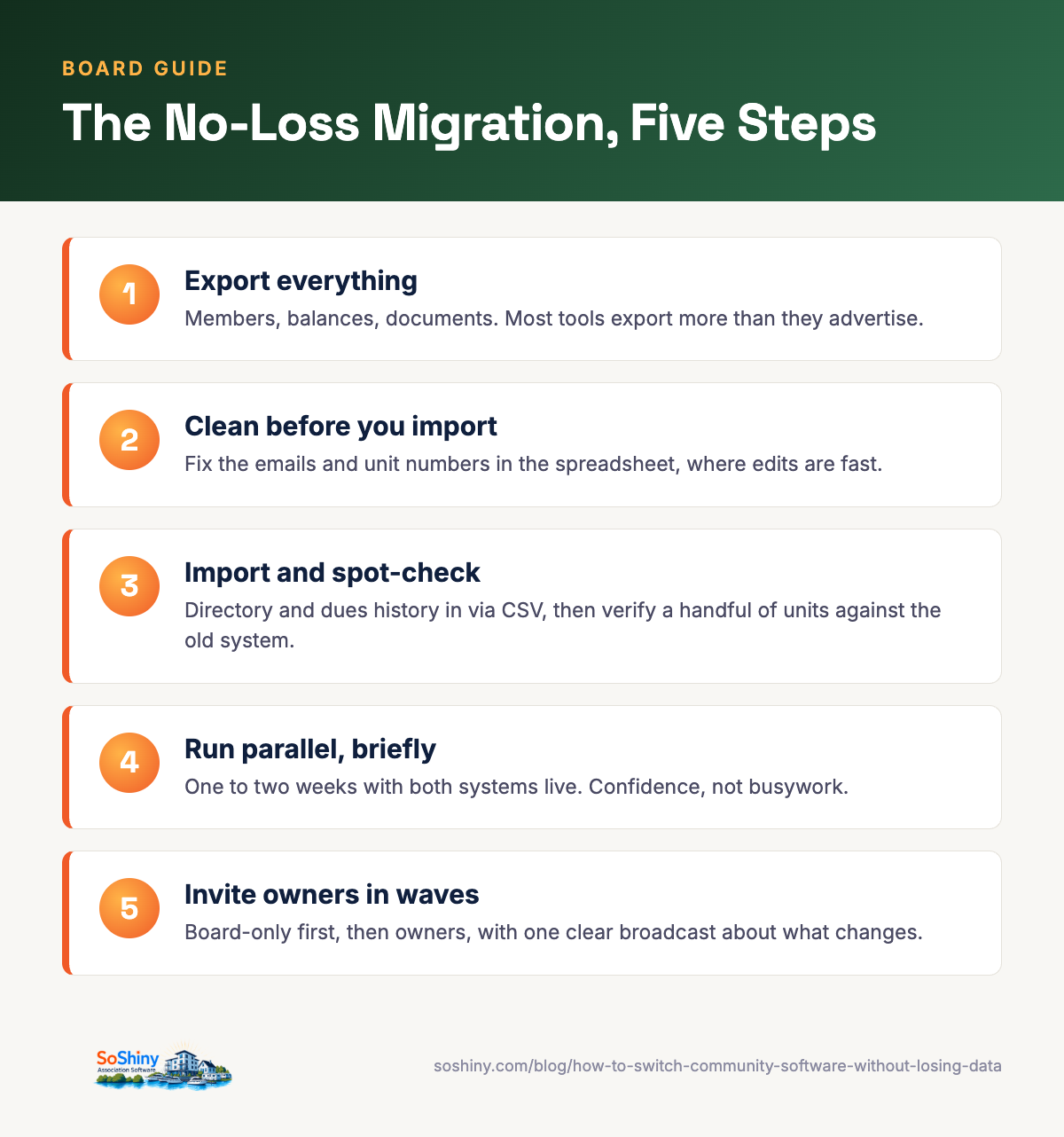
- Five steps move a community in two weeks: export, clean, import, run parallel, bring owners over.
- A vendor that makes export hard is the one you most need to leave.
Step 1: export everything from the old tool
Start by pulling your data out. Ask your current vendor for a full export: members, units, dues history, and documents. Most tools offer CSV downloads somewhere in settings. Does yours make this hard with support tickets, fees, or "let me check with my manager"? That is one more reason you're right to leave. Save every file in one folder before you touch the new system. Keep a copy where a second board member can reach it. The export is your safety net. Nothing that follows can lose data you already saved.
Step 2: clean the data first
A switch is the best data-cleaning moment your association will ever get. For once, someone looks at every row. Remove duplicate members. Update the emails you know are dead. Confirm unit numbers and ownership against your official records. We found units whose "owner" on file had sold years earlier. A couple of owners appeared under three different spellings. Fix it in the spreadsheet now, in bulk, instead of one apologetic edit at a time later. Clean data going in makes a fresh start. Dirty data going in is the old mess in new furniture.
A treasurer's note: reconcile your dues balances now too. Sometimes the old system and your bank records disagree. Find out with both systems still in hand.
Step 3: import into SoShiny
SoShiny takes CSV import for members, units, parking, rules, and FAQs. Drop your PDFs into Documents and tag them by unit or member. Most communities go live in an afternoon, not a month. I moved our 128-unit roster in one sitting. The slowest part was my own spreadsheet cleanup from step 2.
You can start in board-only mode and invite owners later. That is how we did it. The board ran the system quietly first and stocked the document library. Owners arrived to a place that looked lived in, not empty.
Step 4: run both in parallel for a short window
Do not flip the switch cold. Keep the old tool readable for a week or two, and confirm the new one holds everything. This is where the treasurer earns their keep. Check dues balances unit by unit for a sample. I checked every unit with an outstanding balance. Those are the numbers someone will argue about. Spot-check member records. Open a few documents. Once it all lines up, retire the old tool and cancel the subscription. The parallel window turns "I hope it worked" into "I verified it worked." It costs two weeks of overlap fees at most.
Step 5: bring owners over
Tell owners what is changing and why. Send one clear email broadcast with the new login link, what they'll find inside, and who to ask for help. Show them the public page and the dashboard. Then remember the owners who will never see that email. In our building, a lobby TV notice and a printed note at the mailboxes reached the members email never will. Invite in waves in a large or seasonal community. We timed our big invite push for when the snowbirds were paying attention, and it made the difference.
Expect a handful of "how do I log in" calls in week one. That is not failure. That is onboarding. By week three the calls stop, and the answers live where owners can find them.
The part boards miss
The biggest risk is not the import. It is waiting too long out of fear, on a tool that keeps costing you time and money. I know. I was the one voting to wait. Plan the five steps, give yourself a two-week window, and the move is calm. Your data comes with you, and your board finally gets the tool it wanted.
The cost of staying put
Every month on an outgrown tool carries a price. Wasted volunteer hours. Missed payments. Owners who cannot find what they need, so they call a board member. Boards count the risk of moving and ignore the cost of standing still. The wait quietly compounds. In budget terms: the switch is a one-time cost with a known size. Staying put is a recurring cost with no end date. No budget committee approves the second one on purpose.
Put both costs on the table at your next meeting. The fear of switching is loudest right before you start. It goes silent the moment your data lands in the new tool. Plan the five steps and give yourself two weeks. The thing your board dreaded turns out to be the easiest decision it makes all year.
If this guide helped, the tools it describes live in SoShiny, and so does everything else a self-managed board needs. The 30-day trial is free.
Enjoying this? Get the next one by email.
Practical guides for self-managed boards, written by a board treasurer. About one a month.
FAQ about switching community software
How long does it take to switch HOA software?
Can we keep our payment history when we switch?
What if our old vendor will not give us our data?
Do we have to migrate every owner at once?
Will owners notice the switch?
When is the best time of year to switch?
Related reading
- From the blogHow to Choose Community Management Software: a 10-Point Checklist
- From the blogWhat Does Community Software Cost? A Plain Breakdown
- From the blogThe Hidden Cost of Running Your HOA on Email and Spreadsheets
- From the blog5 Systems That Replace Your HOA Management Company
- From the blogFive Jobs Every HOA, Marina, and Camp Shares
SoShiny Software Team is the collective byline for posts written by the people building SoShiny: engineers, designers, and the board members we work with every day.
We write about what actually works for community associations: governance that holds up under scrutiny, communication that residents read, and software that doesn't fight the people using it.
SoShiny is association management software for HOAs, condominium associations, and housing co-operatives anywhere in the United States. Headquartered in Daytona Beach, Florida. Built by people who've sat on a board.