
A vendor roster of your own, not a folder in the books.
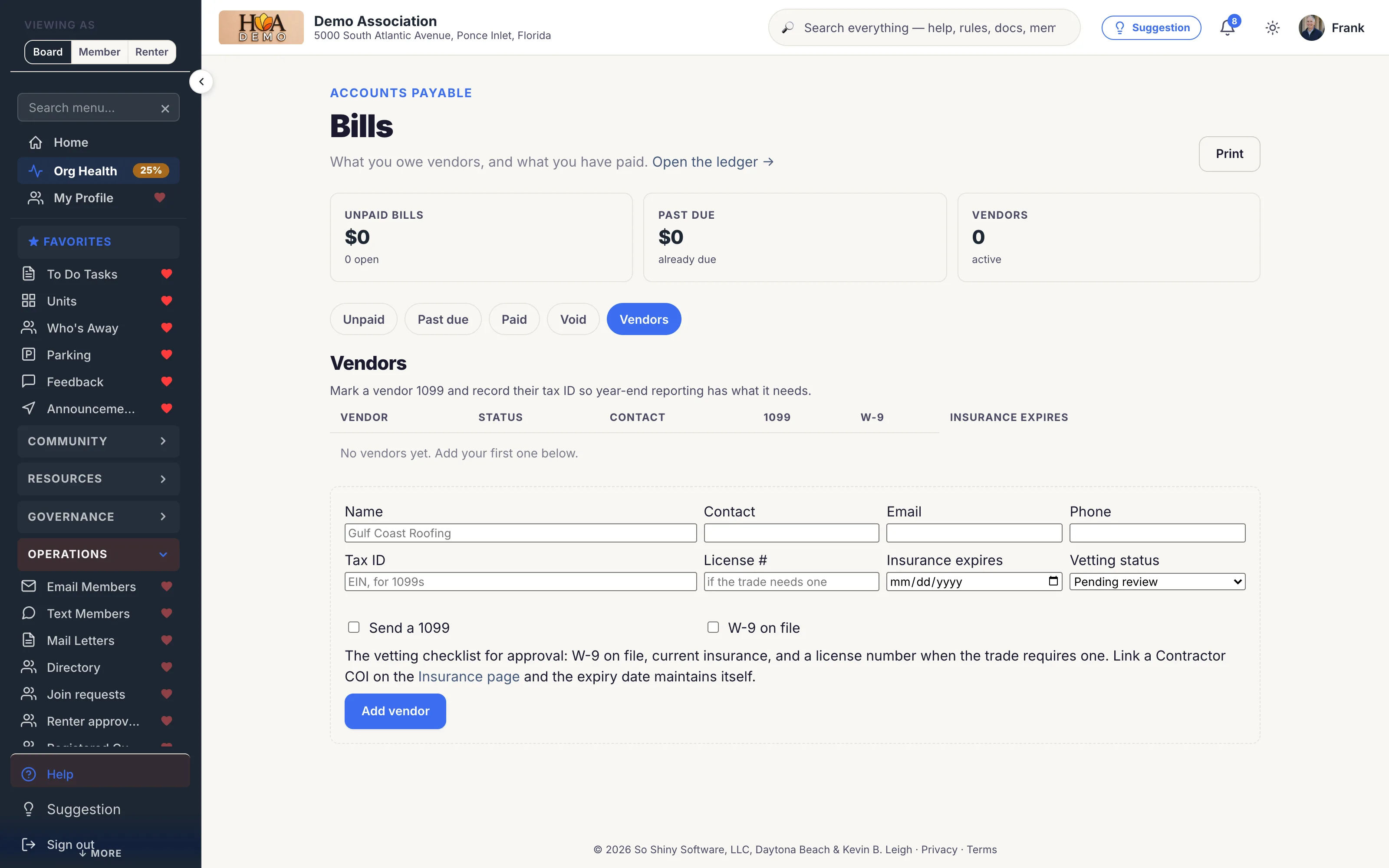
Every vendor carries an approval status and a checklist: W-9, current insurance, and a license copy when they work on the property. Companies can apply themselves. You can import a list. Accounting is optional.
Hiring an uninsured contractor can put liability for their worker's injury on the association. Most boards know this. Very few have a way to stop a payment going out to a vendor whose coverage lapsed in March.
Vendors is its own Operations page, so every association can keep a roster without opening the books. Each vendor has a status: pending review, approved, or suspended. New vendors start pending. Approval takes a checklist a board can actually complete, and once it is clear, one click approves them.
They can apply themselves
Companies apply at yourcommunity.com/vendor. The page finds them by company name, email, or tax ID, so you do not get a second record. Missing paperwork goes out on a private upload link. The link expires in 30 days and they do not need an account.
Bring a list. Work the gaps.
Import a QuickBooks vendor list or any spreadsheet. Matching uses a cleaned company name, then email or tax ID. Existing rows fill empty fields and never overwrite what you already typed. Search the roster. Filter to whoever is still missing an email, a W-9, a certificate, or a license. Download a CSV of the list you are looking at.
The insurance date maintains itself
Link a contractor's certificate of insurance to their vendor record and the expiry date comes from the certificate. The board digest warns when coverage is 30, 14, 7, and 1 day from lapsing. An emergency roof repair on a Saturday is still payable. The system warns loudly and records what was missing.
Pairs with Bills and payables and 1099 reporting.
What you get
How it works
Guides and terms for this feature
- From the blogHow to Switch Community Software Without Losing Your Data
- FeatureFAQ
- From the blogThe Crew Showed Up. The Paper Didn't. The HOA Vendor COI Checklist
- FeatureQuickBooks Import
Set up your association in five minutes.
No credit card. Cancel anytime.
Built for

Condo Association Software That Boards Actually Use
Owners can never find the rules and the board lives in a buried email thread. SoShiny puts your declaration, bylaws, votes, and documents in one searchable portal — plus a free pub…
Cooperative Association Software Built for Co-op Boards
Housing co-ops are not condos and not HOAs — shareholders, proprietary leases, and a board of directors that has to actually enforce the bylaws. SoShiny gives your co-op a searchab…

HOA Management Software Without the Manager Markup
Most boards pay a management company per door for software they barely touch. SoShiny gives your HOA the same tools — violations, voting, documents, directory, and a public website…

Marina Management Software for Slips, Members & Boats
Slip assignments live in a spreadsheet and insurance certificates expire without anyone noticing. SoShiny tracks your members, vessels, slips, and COIs in one portal — with amenity…

Software for Mobile Home Parks & ROCs
Resident-owned mobile home communities, manufactured-housing co-ops, and 55+ parks. SoShiny gives the board a single portal for lot management, online voting, park rules, and share…

Software for Deed-Restricted Communities & POAs
Recorded covenants. Architectural review. Per-lot compliance. SoShiny gives your POA or deed-restricted subdivision a single portal for the covenants residents agreed to, the ARC r…

55+ Community Software Residents Can Actually Read
Too much community tech assumes everyone has a smartphone and 20/20 vision. SoShiny meets residents where they are — a lobby announcement TV, plain email broadcasts, and clear, lar…